

Payment Method
PayPal

How to pay using PayPal:
When you place an order with Paypal you will be redirected to the PayPal payment page, where you can confirm your payment by logging in with your PayPal username and password.
You may still check out even without a PayPal account. To do so, please click on "Pay with Debit/Credit Card" and you’ll be redirected to a secure page where you can enter your credit card information or complete your payment safely via PayPal.
1. Select your cart and click "check out". Fill in your shipping information and click "complete order".
2. In the pop-up window, click on the location on the image below.

3. Choose your bank country.
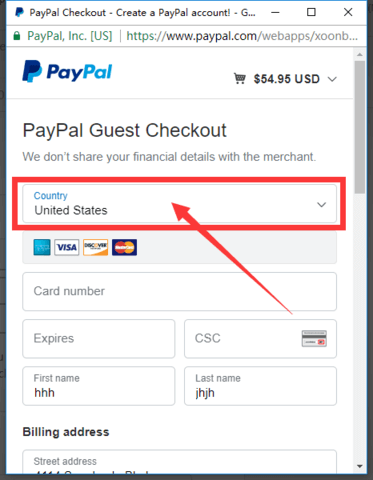
4. Now you can use credit cards to pay.

5. Last Tip:
Do you want to use this credit card to create a paypal account?
According to your needs, choose yes or no.
6. Successful payment.
Credit and Debit Card
Visa / Master / Maestro / Visa Electron / JCB / American Express / Diners Club / Discover.
The available credit card options are listed above. The credit card companies listed above are the most commonly used credit cards on this website.
Other Payment
Sofortbanking, Giropay, Przelewy24, EPS, PIX, Boleto Bancário, Bancontact, MyBank.
Please note that we does not collect your credit/debit card number or personal information when you make payment. For questions regarding your transactions on our site, please consult your card-issuing bank for information or contact us info@tronxy3dprinter.com, they would be happy to help.
